
Use nice URLs like http://<server_url>/index.html when working with local projects.
BlogBlogBlogBlog2020-08-24
Testing the new approach to addressing local files in internal web-server
The latest Pinegrow Web Editor release 5.973 added the setting for changing how the files are addressed when served by Pinegrow’s internal web-server.
Until now, local files were addressed with URLs like http://<server_url>/file://Users/Me/Projects/ABC/index.html
This can cause issues with resources that use root-relative URLs, for example <img src="/images/img.png">.
The new approach is to address files from the local project with URLs that are relative to the project folder.
For example:
http://<server_url>/index.html
Under the hood, Pinegrow maps this URL to the file
<path of the current project>/index.html
At the moment this option needs to be explicitly enabled in Settings, in Internal Web Server & Proxy settings section:
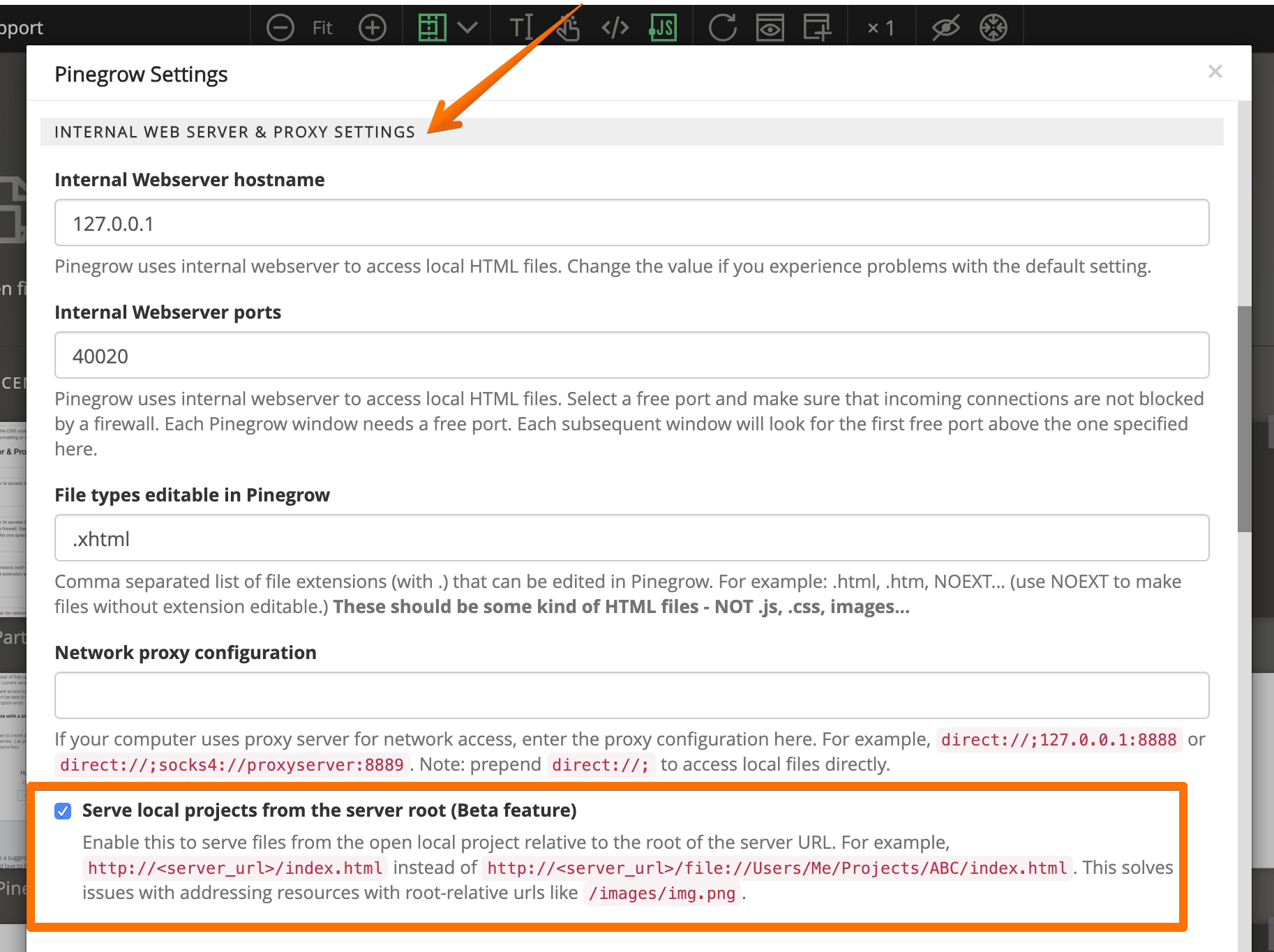
The same nice URLs are now also used when previewing documents in the browser:

The old mode is used by default, unless you activate the Root URLs option in Settings.
Root URLs only work with local files when their parent folder is opened as project in Pinegrow.
After a testing period, this will become the default approach to addressing files in Pinegrow PRO and >.
This feature will remain unchanged in Pinegrow Standard.