
Build and edit Tailwind CSS 4 pages in Pinegrow with visual controls, compile the Tailwind stylesheet into your project or use your own build, and find the right page of the Tailwind Visual Editor documentation.
DocsTailwind CSSDocsTailwind CSS2026-10-24
Tailwind Visual Editor
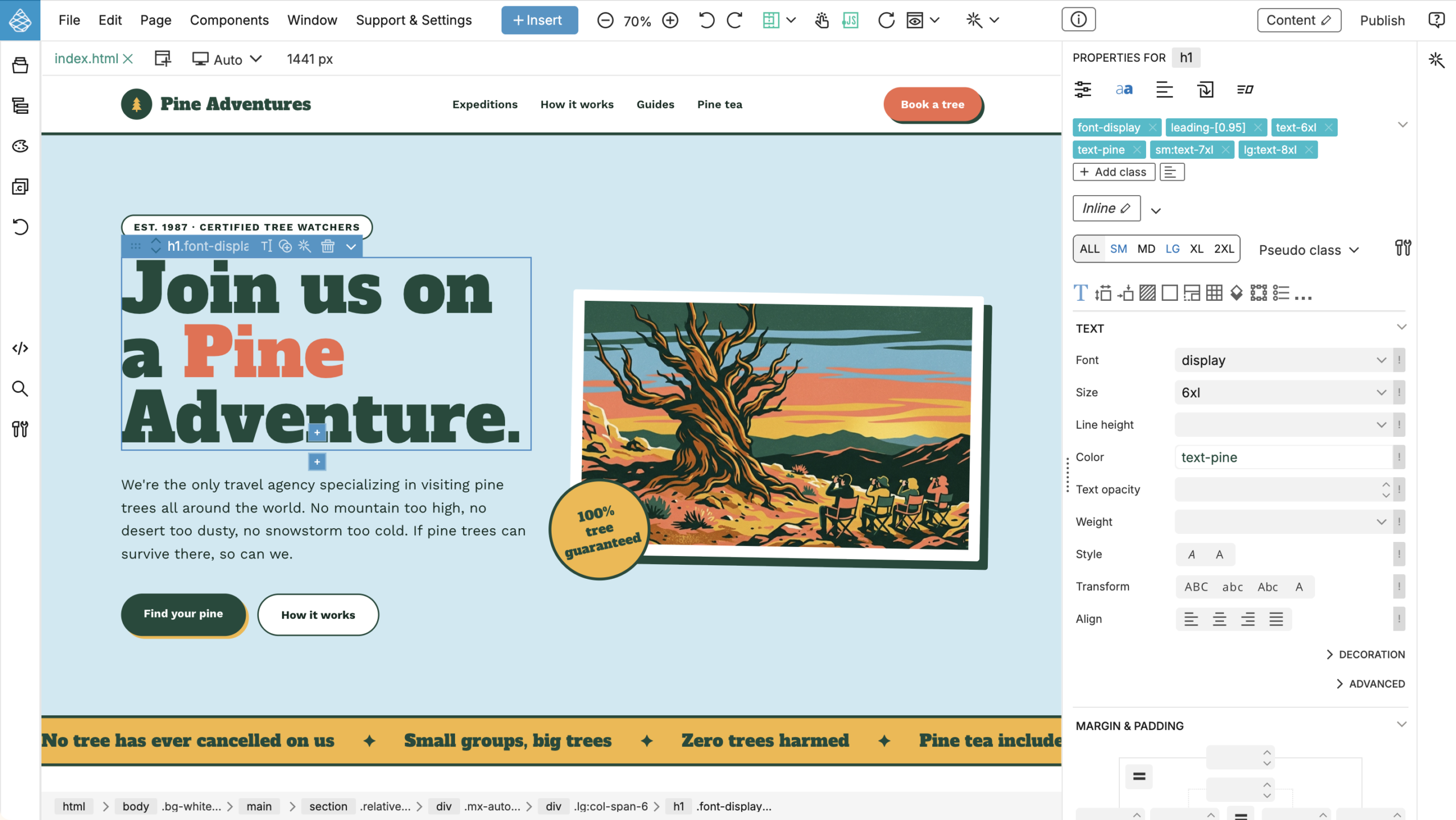
The Tailwind Visual Editor lets you build and edit Tailwind CSS pages in Pinegrow with visual controls instead of typing utility classes by hand. You work on your own HTML files: Pinegrow adds and removes Tailwind classes on the selected element, shows the result in the page view at every breakpoint, and keeps the Tailwind stylesheet of the page up to date.
This documentation is written for Tailwind CSS 4. Pinegrow supports Tailwind CSS 3 too; Working with Tailwind CSS 3 explains what's different.
For an overview of what you can build, see the Tailwind Visual Editor product page.
What you need
- Pinegrow Desktop with the Tailwind Visual Editor add-on. The add-on is included in the free trial. After the trial, your license must include it. Without the add-on, Pinegrow still opens Tailwind pages, but doesn't show the Tailwind controls.
- Or Pinegrow Online. It has the same Tailwind features as Pinegrow Desktop, except the external build process, which needs Pinegrow Desktop.
Where the Tailwind CSS comes from
A Tailwind page needs a stylesheet with the CSS for the classes it uses. Pinegrow can provide it in three ways:
- The Tailwind CDN script. New Tailwind pages start with a script that builds the CSS in the browser. It's quick for prototypes, but every visitor loads it from the internet.
- The built-in compiler. Activate the Design panel and Pinegrow writes the CSS to
tailwind_theme/tailwind.cssin your project, so the published site doesn't load Tailwind from another server. - Your own build process. Keep compiling with npm or the Tailwind CLI, and edit the pages in Pinegrow Desktop.
Tailwind CSS versions, compiling and offline use explains each option and how to switch from the CDN to a compiled stylesheet before you publish.
Start here
- Create or open a Tailwind CSS project. A new Tailwind CSS 4 project gets a compiled stylesheet right away.
- Read Tailwind CSS versions, compiling and offline use to choose how your pages get their CSS.
- Style elements with the visual controls.
Questions? Tailwind CSS questions and answers answers the common ones.
Pages in this section
Get started
- Introduction to Tailwind CSS: how utility classes work, if Tailwind is new to you.
- Create or open a Tailwind CSS project: start a Tailwind CSS 4 project or open an existing one.
- Activate the Tailwind extension: check that the Tailwind Visual Editor is active on a page, and turn it on by hand.
- Tailwind CSS versions, compiling and offline use: CDN script, built-in compiler or external build, and a site with no Tailwind requests.
- Tailwind CSS questions and answers: short answers with links to the details.
Compile and customize
- Design panel and the built-in compiler: colors, fonts and compiler settings for the whole project.
- Use an external Tailwind CSS build: keep your npm or CLI build and edit the pages in Pinegrow Desktop.
- Match visual controls to a custom theme: show your own colors, fonts and sizes in the controls.
- Upgrade a project from Tailwind CSS 3 to 4: convert the classes of a page or a whole project.
- Working with Tailwind CSS 3: what still applies to Tailwind CSS 3 projects.
Edit and style
- Visual controls: set Tailwind classes with the controls in the Visual controls panel.
- Class Tree inspector: see and edit the classes of an element by breakpoint and state.
- Floating Tools: quick controls next to the selected element.
- Helpers: editing aids for Tailwind pages.
- Styles: reuse sets of classes.
- CSS styling with Component Styles: style components with CSS rules.
Components and learning
- Tailwind Blocks: ready-made sections you can insert into Tailwind CSS 3 and 4 pages.
- Component libraries: use Tailwind component libraries in Pinegrow.
- TailwindUI: use TailwindUI components.
- Tutorials: step-by-step Tailwind projects.
- What's new in the Tailwind Visual Editor: changes by release.
In this section
What’s new in the Tailwind Visual Editor
Tailwind Visual Editor changes in each Pinegrow release, newest first, from Tailwind CSS 4 support and Tailwind 3 to 4 conversion to component styles and the CSS Grid…
Introduction to Tailwind CSS
How Tailwind CSS 4 styles a page with utility classes, theme values, responsive and state variants, container queries and arbitrary values, how to keep long class lists manageable…
Create or open a Tailwind CSS project
Create a new Tailwind CSS 4 project in Pinegrow with a compiled local stylesheet, keep it in the folder you choose, or open an existing Tailwind project, including…
Activate the Tailwind extension
Pinegrow activates the Tailwind Visual Editor on Tailwind pages automatically. Check that it’s active, and activate it by hand when your stylesheet has another name.
Tailwind CSS versions, compiling and offline use
Pinegrow supports Tailwind CSS 4 and 3. Prototype with the Tailwind CDN script, compile a local stylesheet with the built-in compiler so the site makes no Tailwind requests…
Visual controls
Style the selected element with Tailwind CSS visual controls. Edit its class list, choose the screen size and variant you are editing, find controls by section, and use…
Class Tree inspector
Edit all Tailwind CSS classes of the selected element and its parents in a tree grouped by variant. Add classes by typing, preview values on hover, type arbitrary…
Styles
Group Tailwind CSS classes into named styles, assign them to elements and change them in one place. Use component styles that compile into CSS rules, or class styles…
CSS styling with Component Styles
Use Tailwind CSS classes and Pinegrow’s Tailwind tools to write regular selector-based CSS. Component styles compile into CSS rules such as h1 or .card, so the HTML keeps…
Match visual controls to a custom theme
Make the Tailwind visual controls and the Class Tree offer your own colors, fonts, font sizes, radii, shadows and breakpoints. With the Design panel this happens automatically; with…
Design panel and the built-in compiler
Activate the Design panel to compile your Tailwind CSS project into one stylesheet, tailwind_theme/tailwind.css, with Pinegrow’s built-in Tailwind CSS 4 compiler. Set colors, fonts and backgrounds, save design…
Floating Tools
Apply Tailwind CSS text, background and alignment classes from a palette that floats over the page. Set classes on the selected elements, or pick up a tool and…
Tailwind Blocks
Build Tailwind CSS pages from hundreds of ready-made blocks and start projects from website templates. The blocks work in Tailwind CSS 4 and 3 projects and are converted…
Component libraries
Open ready-made Tailwind CSS component libraries, such as Tailwind Blocks and Flowbite, from the + Insert button and drag their components onto your page. Add your own pages…
Use an external Tailwind CSS build
Compile Tailwind CSS 4 with your own build, for example the Tailwind CLI, while you edit in Pinegrow Desktop. Pinegrow writes the classes you use to _pginfo/used-classes.html, your…
Helpers
Tailwind CSS helpers in Pinegrow. Swap one colour for another across an element and its children, remove Tailwind classes, jump from a class to its visual control, and…
TailwindUI
TailwindUI is a premium Tailwind component library created by authors of TailwindCSS. Tailwind Visual Editor adds the TailwindUI library into the Library panel and extends visual controls with…
Upgrade a project from Tailwind CSS 3 to 4
Convert the Tailwind CSS 3 classes in a page or a whole project to Tailwind CSS 4 with Convert Tailwind 3 to 4, switch the built-in compiler to…
Working with Tailwind CSS 3
What is different for projects that stay on Tailwind CSS 3 – the starting page, the built-in 3.4.3 compiler and its JSON configuration, an external build with tailwind.config.js…
Tailwind CSS questions and answers
Short answers about Tailwind CSS in Pinegrow, with links to the details. Tailwind 4 or 3, sites with no external requests, CDN prototypes, compiled CSS, custom themes, plugins…
Tailwind CSS tutorials
Tutorials and videos for the Tailwind Visual Editor, from the Pine Adventures playground project with its guided tour to step-by-step landing page and WordPress theme tutorials.