
Convert the Tailwind CSS 3 classes in a page or a whole project to Tailwind CSS 4 with Convert Tailwind 3 to 4, switch the built-in compiler to 4.2.2, and know what you still have to change by hand.
DocsTailwind CSSDocsTailwind CSS2026-10-24
Upgrade a project from Tailwind CSS 3 to 4
Pinegrow converts the Tailwind CSS 3 classes in your pages to their Tailwind CSS 4 names, for a single page or a whole project. It also replaces the Tailwind 3 CDN script, and on a project with the Design panel it switches the built-in compiler to Tailwind CSS 4. Tailwind CSS 4 also changed some default styles and the configuration format, which you check and change yourself.
The conversion works in Pinegrow Desktop and Pinegrow Online. Upgrading an external build is described at the end of this page.
Before you start
- Make a backup of the project, or commit it to version control. Converting the project saves every page and can't be undone.
- Tailwind CSS 4 needs recent browsers: Safari 16.4, Chrome 111 and Firefox 128 or newer. If the site must work in older browsers, stay with Tailwind CSS 3.
Convert the classes
Open the Tailwind CSS menu, in the Project settings menu or under the Settings & Tools icon in the Visual controls panel (Desktop), and choose Convert Tailwind 3 to 4….
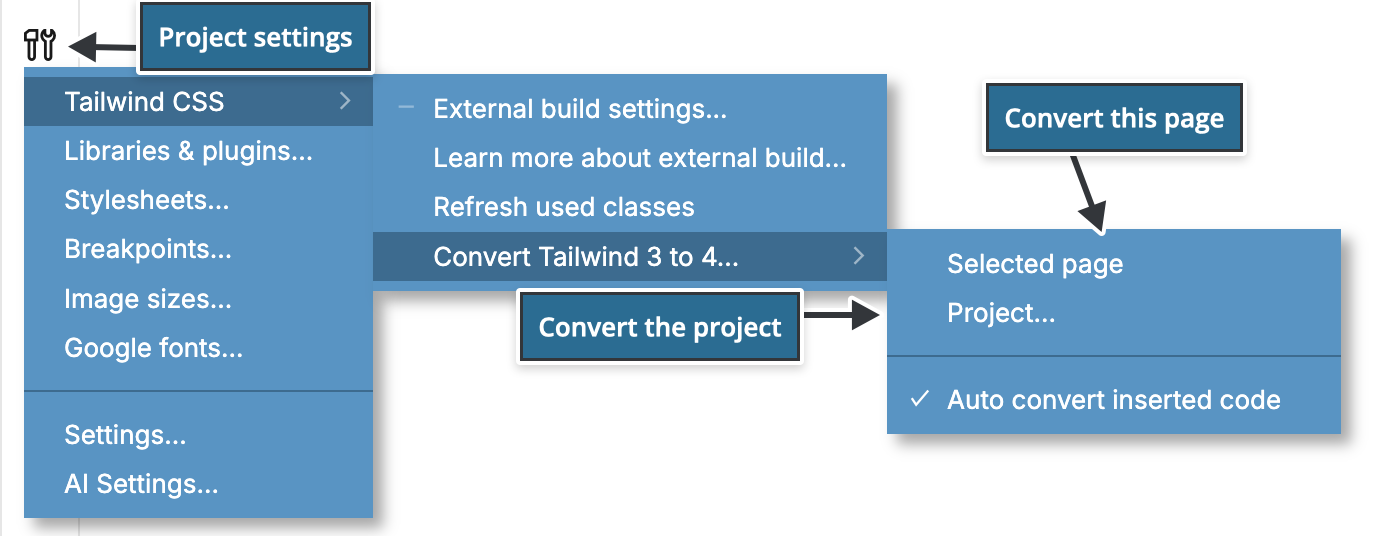
- Selected page converts the page you are editing and saves it.
- Project… converts all editable pages of the project and saves them. Pinegrow asks Convert to Tailwind 4? first. Click Yes, convert.
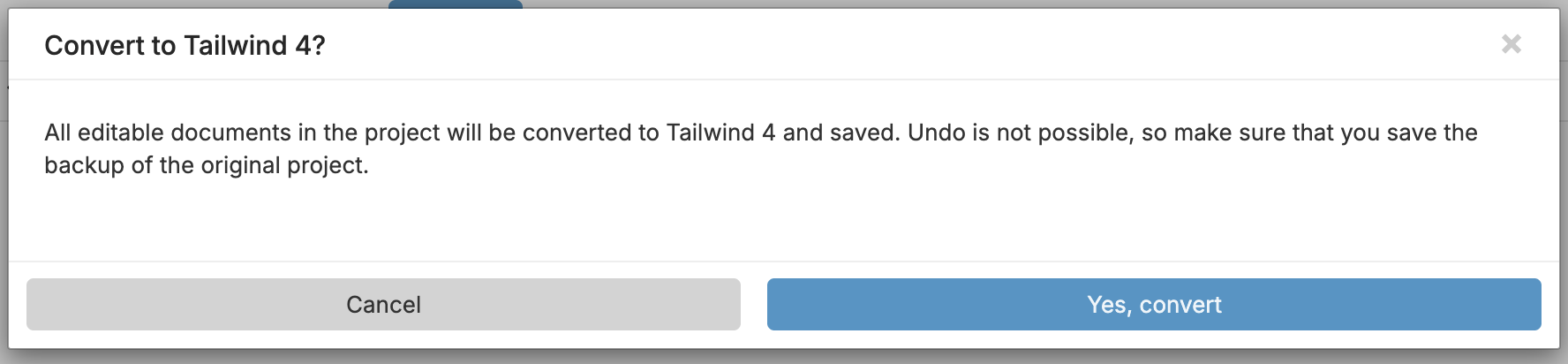
Convert each page only once. Converting a page that already uses Tailwind CSS 4 renames its classes once more, for example shadow-sm to shadow-xs. Pinegrow asks Convert to Tailwind 4 again? before it converts such a page, and Project… skips pages that load the Tailwind CSS 4 browser script.
Pinegrow 10.1 and below: the converter doesn't check which version a page uses and converts every page without asking. Convert only pages that still have Tailwind CSS 3 classes.
When you open a new page made with Tailwind CSS 3 classes, for example from the Tailwind CSS 3 template, Pinegrow asks Convert the page to Tailwind 4?. Yes, use Tailwind 4 converts that page.
What the converter changes
- Renamed classes:
shadow-smbecomesshadow-xsandshadowbecomesshadow-sm. The same shift applies todrop-shadow,blur,backdrop-blurandrounded. outline-nonebecomesoutline-hidden,ringbecomesring-3.flex-shrink-*andflex-grow-*becomeshrink-*andgrow-*.overflow-ellipsisbecomestext-ellipsis, anddecoration-sliceanddecoration-clonebecomebox-decoration-sliceandbox-decoration-clone.- Opacity classes merge into the color:
bg-blue-500 bg-opacity-50becomesbg-blue-500/50. This works forbg,text,border,divide,ringandplaceholder, also with variants such ashover:. - The Tailwind 3 CDN script
https://cdn.tailwindcss.combecomes the Tailwind 4 browser scripthttps://unpkg.com/@tailwindcss/browser@4. A link to a Tailwind 2 stylesheet onunpkg.com/tailwindcssis replaced with the same script.
Check the opacity conversions. If the element has an opacity class but no color class Pinegrow knows, the converter uses black, for example bg-opacity-50 alone becomes bg-black/50.
Pinegrow 10.1 and below: the converter replaces the CDN script only when its address ends with a slash,
https://cdn.tailwindcss.com/. If a page loadshttps://cdn.tailwindcss.com, replace the script yourself:
<script src="https://unpkg.com/@tailwindcss/browser@4"></script>What the converter doesn't change
- CSS files: your own stylesheets,
@applyrules, the CSS file with additional rules of the Design panel and the source stylesheet of an external build. - Configuration:
tailwind.config.jsand the Custom configuration of the Design panel. - Classes written in JavaScript code.
- Default styles that changed in Tailwind CSS 4. Borders and rings now use the current text color instead of gray,
ringis 1px instead of 3px, placeholders use the text color at half opacity, and buttons no longer show a pointer cursor. Where your design relied on the old defaults, add a color class, for exampleborder-gray-200, or the base styles from the Tailwind CSS upgrade guide.
Convert inserted code automatically
Auto convert inserted code, in the same submenu, converts Tailwind CSS 3 classes in code you insert into a Tailwind CSS 4 page, such as Tailwind Blocks, which are written in Tailwind CSS 3. Pinegrow shows Tailwind 3 code was converted to Tailwind 4. The option is on by default. Click it to turn it off or on. Turn it off before you insert code that already uses Tailwind CSS 4 classes, so they are not renamed again.
Pinegrow 10.1 and below: inserted code is converted twice, so
shadowbecomesshadow-xsinstead ofshadow-sm, androunded,blur,drop-shadowandbackdrop-bluralso end one size smaller. Check these classes after you insert a block and change them back where needed.
Switch the built-in compiler to Tailwind CSS 4
If the project uses the Design panel:
- Project… switches the compiler to Built-in JIT compiler (4.2.2) for you.
- After Selected page, switch it yourself when all pages are converted: click Compiler & custom config… in the Design panel and set Compiler to Built-in JIT compiler (4.2.2).
The Tailwind CSS 3 Custom configuration is JSON. Tailwind CSS 4 uses CSS with an @theme block, so rewrite your settings as theme variables. For example, the Tailwind 3 setting "theme": {"extend": {"screens": {"3xl": "1800px"}}} becomes:
@theme {
    --breakpoint-3xl: 1800px;
}
Add config settings… in the same dialog inserts Tailwind CSS 4 examples.
Upgrade an external build
Pinegrow doesn't upgrade an external build. Use Tailwind's upgrade tool in the project folder. It needs Node.js 20 or newer, updates the dependencies, moves the configuration from tailwind.config.js to CSS and renames classes in your files:
npx @tailwindcss/upgradeRun it on a separate branch or a copy, and review the changes. Then set up the build for Tailwind CSS 4 and connect it to Pinegrow as described in Use an external Tailwind CSS build, including the @source line for Pinegrow's class list. Pinegrow reads the Tailwind CSS version of the build from node_modules/tailwindcss.